





How to Claim the Early Purchase Bonus
In Europe and North America, the Early Purchase Bonus will be available from 00:00 on Thursday, September 17, 2026. In Southeast Asia, the Early Purchase Bonus ended at 23:59 on Saturday, August 15, 2026.
For purchasers of the Physical version or Digital version
How to Download via Nintendo eShop
- Turn on your Nintendo Switch and select “Nintendo eShop” from the HOME Menu.
- Select the user who will download the content.
- Select "Search/Browse" from the left-hand menu, then enter "Culdcept BEGINS" in the search field.
- Select "Culdcept BEGINS Early Purchase Bonus Add-on Content" from the search results.
- Download the content from the product page.
*Once the download is complete, you can access the bonus content in the game.
Obtained from the Game Software
After launching the game, download the Early Purchase Bonus from the main menu by following the steps below.
-
1.
Select "Options" 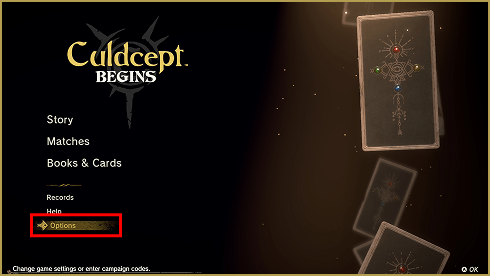
-
2.
Select "Accept Rewards". 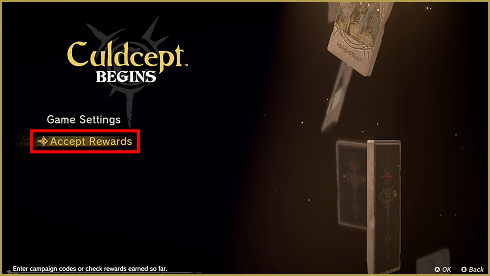
-
3.
Select "Access Product Page". 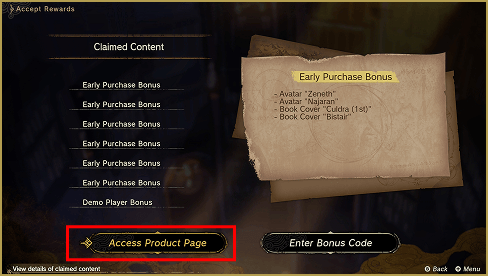
- 4.On the Nintendo eShop product page, download the "Early Purchase Bonus Add-on Content".
*Once the download is complete, you can access the bonus content in the game.